Before Connected Campaigns, Account Engagement and Salesforce each kept their own idea of what a campaign was. Marketing reported on Account Engagement campaigns; sales and finance reported on Salesforce campaigns; the two lists overlapped by name only, and nobody could reconcile them without an export and a free afternoon.
Connected Campaigns collapses that into one list, with Salesforce as the system of record. It is one of the highest-value configuration changes available in an Account Engagement estate — and one of the few that is genuinely harder to do later than to do now.
Key takeaways
- Connected Campaigns makes Salesforce campaigns the single source of truth, with Account Engagement campaigns mapped to them.
- Clean up before you connect. Enabling it against a messy campaign list preserves the mess and makes it more visible.
- Campaign influence is only as good as campaign membership, and membership must be created automatically.
- Standardise member statuses across campaign types or your funnel maths compares incomparable things.
- Attribution credibility comes from consistent plumbing, not from a sophisticated model.
What changes when you connect
| Before | After |
|---|---|
| Two separate campaign lists that share names by convention | One list, managed in Salesforce, visible in both |
| Marketing asset performance invisible in CRM reporting | Engagement rolls up to the Salesforce campaign |
| Campaign influence limited to what CRM knows | Marketing touches become influence records |
| Reconciliation done by export | One number, one place |
The practical effect is that a marketing campaign stops being a marketing-only object. It becomes something the CFO can see in a pipeline report, which changes how marketing is discussed at a level that no dashboard redesign ever achieves.
Prepare before you enable
Enabling Connected Campaigns against an untidy campaign list does not fix anything; it makes the untidiness permanent and visible. Spend the time first.
- Audit both campaign lists. Export from each side. Expect duplicates, test campaigns, campaigns named after the person who created them, and several years of one-offs.
- Agree a naming convention and apply it. Something with year, channel, region and a short descriptor. Boring, consistent, sortable. This is the moment to do it, because renaming later is much harder once records reference them.
- Design the hierarchy to match how the business budgets and reports. Programme above channel above individual campaign is a common shape. Get it right now; retrofitting is painful.
- Standardise campaign types and member statuses so the same status means the same thing everywhere. Write the definitions down next to the campaign type.
- Decide what to archive. Old campaigns with historical members should generally be kept but marked inactive, not deleted. Deleting destroys attribution history you may want.
- Map the pairs explicitly for campaigns that exist on both sides, rather than letting matching happen by chance.
This is a one-way door
Connected Campaigns is not designed to be switched off casually, and the mapping it establishes affects reporting history. Treat enablement as a project with a sandbox rehearsal, a defined cutover, and a rollback plan — not as a Friday afternoon checkbox.
The membership problem
Once connected, attribution quality is decided by one thing: whether campaign member records exist for every meaningful touch.
This is where most B2B attribution quietly fails. Form submissions create members automatically; a webinar imported from a spreadsheet by someone in a hurry may not. A conference badge scan lands in a CRM list that never becomes campaign members. An ad platform reports clicks that never reach the CRM at all.
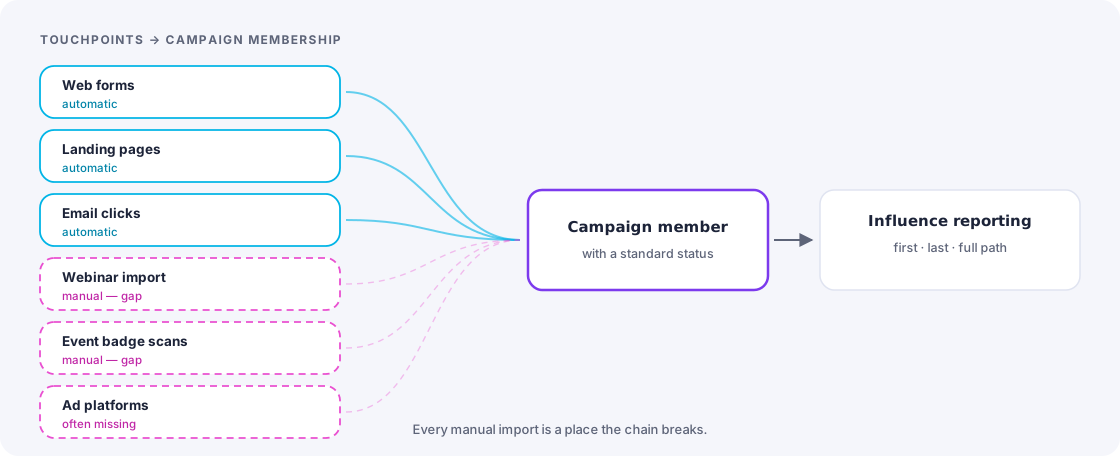
Two rules close most of the gap. Every touchpoint gets a campaign, and every campaign gets automatic membership creation — through forms, completion actions, automation rules or integrations, never by someone remembering. And every manual import follows a documented template that includes campaign and member status columns, so an event list becomes members on the day rather than eventually.
Member statuses that make the funnel add up
Statuses are the vocabulary of your funnel. If “Responded” means “clicked” on an email campaign and “attended” on a webinar, any funnel report combining them is producing a number with no meaning.
Define a small standard set and map each campaign type to it. A workable pattern:
| Standard status | Meaning | Example by type |
|---|---|---|
| Targeted | Included in the audience, no action yet | Sent an email; invited to an event |
| Engaged | A meaningful, low-commitment action | Clicked; registered |
| Responded | The action the campaign was designed to produce | Submitted the form; attended |
| Converted | Progressed to the next funnel stage as a result | Became an MQL or created an opportunity |
Four statuses that mean the same thing everywhere are worth more than twenty that are precise per campaign type and incomparable across them.
Building influence reporting
With membership and statuses in order, influence models become straightforward. Three views cover almost every question that gets asked:
First touch — what creates demand
Credit to the campaign that first brought the contact into your database. Answers “where do our customers come from” and is the right lens for brand and top-of-funnel investment.
Last touch before opportunity — what converts
Credit to the last campaign the contact engaged with before an opportunity was created. Answers “what turns interest into a sales conversation” and is the right lens for demand-generation spend.
Full path — what participates in complex deals
Credit distributed across all campaigns that touched the buying group during the sales cycle. Worth the effort for large deals with long cycles and multiple stakeholders; overkill for transactional business.
Account-level influence in B2B
In complex B2B, the individual is the wrong unit. Six people at one account research independently, and the person who fills the final form is often not the one who did the evaluating. Roll influence up to the account and report on which campaigns touched the buying group — the picture changes substantially, usually in favour of the content nobody was getting credit for.
What to report, and to whom
Three audiences, three reports.
Marketing operations, weekly: campaign membership creation volume by source, records failing to become members, campaigns with no members, and status distribution anomalies. This report exists to catch plumbing failures before they become an attribution argument.
Marketing leadership, monthly: pipeline sourced and influenced by campaign and channel, cost per opportunity where cost data exists, and conversion rates between standard statuses. Enough to reallocate next month’s budget.
The business, quarterly: marketing-sourced pipeline and revenue, trend over four quarters, and cost per acquisition. Four numbers, a trend line, and two paragraphs of written commentary.
Common failure modes
- Campaigns created without a plan. Every ad hoc campaign created outside the naming convention and hierarchy degrades the whole model. Restrict who can create campaigns, or run a monthly tidy.
- Statuses drifting per campaign. Someone adds “Attended – Partial” and now three reports do not count it. Lock the status sets to campaign types.
- Cost data missing. Without campaign cost, every efficiency metric is unavailable. Even rough allocated numbers beat empty fields.
- Opportunity contact roles left blank. Account-level and full-path influence depend on knowing which contacts were on the deal. If reps do not populate contact roles, the sophisticated models silently degrade to guesswork.
That last one is worth escalating early, because it is the most common reason a well-built attribution model produces disappointing output. The model is fine; the input never arrived.
The takeaway
Connected Campaigns is not really a reporting feature. It is a decision to have one definition of a campaign across marketing, sales and finance. Clean up first, standardise statuses, automate membership, and insist on contact roles — and marketing reporting stops being a parallel universe that sales politely ignores.
Frequently asked
Seeing this in your own org?
The first call is free: thirty minutes, no slides, and an honest read on what a fix would take. If it is not worth doing, you will hear that too.