The sync queue is the closest thing Account Engagement has to a check-engine light. When it is empty, the connector is doing its job and prospect data matches CRM data. When it has thousands of records in it, something has been silently broken for a while — and by the time anyone notices, sales has already lost confidence in what they see on the lead record.
The good news: sync failures are not mysterious. In practice they come from three root causes, each with a distinct signature and a specific fix.
Key takeaways
- Three root causes cover the overwhelming majority: validation and required fields, Apex and automation limits, and field-level mismatches.
- Read the actual error text before theorising. The message names the failing rule or field far more often than people expect.
- The connector user’s permissions are a frequent silent cause — it needs access to every field it is asked to write.
- Clearing the backlog without fixing the cause guarantees it returns, usually within a week.
- Zero is the only acceptable steady-state queue depth. Anything above that is a number you will stop looking at.
First: read the error
Before any theorising, pull the actual error text for a sample of failures — the connector’s error view lists them per record. Group by message rather than by record. Almost always, thousands of failures collapse into two or three distinct messages, and each message points directly at its cause.
| Error signature | Root cause family | First thing to check |
|---|---|---|
| Named validation rule in the message | Validation and required fields | The rule itself — does it account for records created by integrations? |
| “Required field missing” or a field API name | Validation and required fields | Whether the field is required on the layout, the object, or by a rule |
| “Apex CPU time limit exceeded” | Automation limits | Triggers and flows firing on Lead and Contact |
| “Too many SOQL queries” / “Too many DML statements” | Automation limits | Non-bulkified automation processing sync batches |
| “Insufficient access” or a field-level security message | Permissions | The connector user’s profile and field permissions |
| “Invalid value for picklist” / conversion errors | Field mismatch | Field type and picklist value alignment on both sides |
| “Duplicate value found” | Duplicate management | Matching and duplicate rules on Lead and Contact |
Root cause one: validation rules and required fields
The most common cause by a distance. Someone adds a validation rule — “Industry is required on all Leads”, “Phone must be populated before conversion” — with human data entry in mind. The connector then tries to create or update a prospect record that cannot satisfy it, and every affected record fails.
What makes this hard to spot is the delay. The rule is added in March for good reasons; the sync failures accumulate quietly; someone notices in June and looks for something that changed in June.
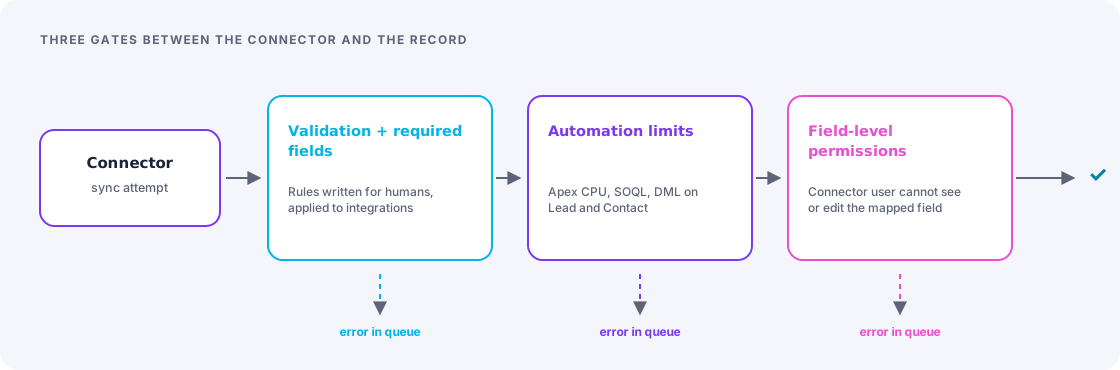
The fix is to make integration-created records a first-class case in your validation design, rather than an afterthought:
- Identify every validation rule on Lead and Contact. There are usually more than anyone remembers.
- For each, ask: should this apply to a record created by an integration, or only to human data entry?
- Where it should not apply, add an explicit bypass — a custom permission on the integration user, or a check on the running user, is cleaner and more auditable than a profile-ID list that rots.
- Where it genuinely should apply, fix the data upstream: make the field required on the form, or default it in the connector mapping.
- Document the decision next to the rule so the next person does not undo it.
Use one custom permission, not a list of user IDs
Create a single custom permission such as Bypass_Marketing_Validation, assign it to the connector user, and reference it in the rules that should not apply to integration traffic. When the integration user changes, you assign a permission instead of editing fifteen validation rules and missing two.
Root cause two: Apex CPU and automation limits
The signature is intermittent failures during high-volume periods, with limit-related messages. The connector processes records in batches; if triggers, flows and managed-package automation on Lead or Contact are heavy or non-bulkified, a batch can exceed a governor limit and the whole batch fails.
This one is frustrating because nothing is “broken” — the same records often succeed on retry when the org is quieter, which makes it look random and delays diagnosis.
Diagnosis: list every trigger, flow and managed-package automation that fires on Lead and Contact create and update. Check for non-bulkified patterns — SOQL queries or DML statements inside loops are the classic. Look at whether entry criteria are tight enough that automation skips records it does not care about.
Fixes, in order of preference:
- Tighten entry criteria so automation only runs when relevant fields change. Cheapest fix, often sufficient on its own.
- Bulkify the offenders. Real work, but it fixes the cause rather than the symptom, and it helps every other bulk process too.
- Move non-urgent work to asynchronous processing so it does not consume the synchronous transaction’s budget.
- Add a bypass for the connector user on automation that genuinely does not need to run for marketing-sourced updates, with a scheduled process to catch up afterwards if needed.
Managed packages count too
Installed packages frequently add their own triggers on Lead and Contact. They contribute to the same limits and you cannot rewrite them. If a package is the main consumer, your options are its own configuration settings, a support conversation with the vendor, or reducing what else runs alongside it. Rule it in or out early rather than after refactoring your own code.
Root cause three: field mismatches and permissions
Quieter than the other two and often the reason a “successful” sync still produces wrong data.
Four things to check, in this order:
- Connector user field permissions. If the connector user cannot see or edit a mapped field, that field silently does not sync. The record appears to sync fine; one value is just never updated. This is the single most under-diagnosed cause of “the data is wrong but there are no errors.”
- Type compatibility. Text into number, a long text value into a shorter field, a date format mismatch. Each produces conversion errors or silent truncation.
- Picklist alignment. Values must match exactly, including case and spacing. A picklist restricted on the CRM side will reject anything not on its list. If both sides are maintained by different teams, they will drift.
- Sync behaviour per field. Each mapped field has a rule about which system wins. Fields set to “use Salesforce value” will overwrite marketing data every sync — which is correct for some fields and an unpleasant surprise for others. Review these deliberately rather than accepting the defaults.
Clearing the backlog safely
Once the cause is fixed, work through the queue in this order:
- Fix the cause first. Retrying against an unfixed cause just re-fails and wastes hours.
- Sample twenty failed records and confirm they now succeed individually.
- Retry in batches, not all at once — a large retry can itself trigger the Apex limits you just fixed.
- Watch the error count after each batch. If new errors appear, stop and read them; there is a second cause.
- Reconcile afterwards. Some records will have diverged during the outage — check a sample for fields that are now stale on one side.
Monitoring so it does not come back
The reason sync problems get large is that nobody is watching. Three lightweight controls:
- A daily check on queue depth with an alert above a low threshold — a scheduled report or a simple automated notification is enough. The point is that a human sees a number every day.
- A named owner. One person whose job includes looking. “The team” does not look.
- A change-control habit: anyone adding a validation rule, required field or trigger on Lead or Contact checks the sync impact before deploying. Add it to the deployment checklist so it survives staff changes.
Set the alert threshold low
An alert that fires at 500 errors trains people to ignore a queue of 400. Set it at a handful. A well-behaved connector genuinely sits at zero, and any sustained non-zero value is worth thirty seconds of attention.
The takeaway
Sync errors look like an integration problem and are almost always a governance problem: a validation rule written without integrations in mind, automation that was never bulkified, a permission nobody granted. Read the error, group by message, fix the cause, then retry in batches — and put a daily eye on the queue so the next one is a five-minute fix rather than a rescue project.
Frequently asked
Seeing this in your own org?
The first call is free: thirty minutes, no slides, and an honest read on what a fix would take. If it is not worth doing, you will hear that too.