For a certain kind of Marketing Cloud developer, AMPscript was a superpower. Anything the platform could not do declaratively, you could do in a code block: lookups, loops, conditional content, date maths, API calls from a landing page. It made hard things possible.
It also made a lot of easy things invisible. Business logic ended up living inside email templates, where it could not be tested, reused, reported on, or found by anyone who had not written it.
Marketing Cloud Next does not run AMPscript. It uses an expression-based, Handlebars-style personalisation syntax, with orchestration in Flow and data in Data 360. This is not a like-for-like swap, and pretending otherwise is how migrations go wrong. The useful exercise is to sort your existing logic into four buckets and translate each one on its own terms.
Key takeaways
- Most AMPscript falls into four buckets: presentation, data retrieval, business logic and integration. Only the first stays in the message.
- Lookups mostly disappear — in Data 360 the attribute should already be on the profile you are sending to.
- Business logic moves up into Flow or into the data layer, where it becomes testable and reusable.
- CloudPages have no direct equivalent; the replacement is usually Experience Cloud, a form platform or a real web application.
- Expect the rebuild to remove logic rather than translate it. That is the actual return on the work.
Bucket one: presentation logic
Conditional blocks, salutations, formatting, defaults. This is the bucket that translates most directly, and it is the one that belongs in the message.
| What you were doing | Classic approach | Marketing Cloud Next approach |
|---|---|---|
| Personalise a salutation with a fallback | %%[IF Empty(@FirstName) THEN ...]%% | Expression with a default value, inline in the content |
| Show a block only for a segment | AMPscript IF around an HTML block | Conditional block in the content editor, driven by a profile attribute |
| Format a date or currency for a locale | FormatDate, FormatCurrency | Formatting helpers in the expression syntax |
| Loop over order lines | ROWCOUNT plus FOR over a lookup result | Iterate over a related collection already available on the profile |
The important shift is one of attitude rather than syntax. The expression layer is deliberately less powerful than AMPscript. That is a design choice, not an omission — and it is a good one, because the things AMPscript let you do inside a template are almost all things that should not happen inside a template.
Bucket two: data retrieval
This is where the biggest reduction happens, and where teams are most surprised.
A large share of real-world AMPscript is Lookup, LookupRows and LookupOrderedRows against data extensions — fetching the account manager’s name, the nearest store, the last three orders, the loyalty tier. Each of those is a small database query executed at render time, per recipient.
In Marketing Cloud Next, the answer to “how do I look this up at send time” is usually you do not. If a value is needed for personalisation, it should be an attribute on the unified profile or on a related object already available in the sending context. The work moves upstream into the data model.
Reframe the question
For each lookup in your inventory, ask: “what attribute would need to exist for this lookup to be unnecessary?” That question produces your Data 360 modelling backlog directly — and it produces it in business language, which makes it far easier to prioritise than a list of technical debt.
There is a real trade-off here and it should be named. Render-time lookups are always current; modelled attributes are as current as their refresh cadence. For most marketing use cases that is a non-issue. For genuinely real-time values — live inventory, a balance, a booking status — the answer is a real-time data pathway rather than a lookup hidden in an email template, and that is a deliberate architecture decision to make once.
Bucket three: business logic
Eligibility rules, discount calculations, next-best-offer selection, complex branching. In classic implementations this frequently ended up in AMPscript because that was the only place a marketer could get logic executed without an admin.
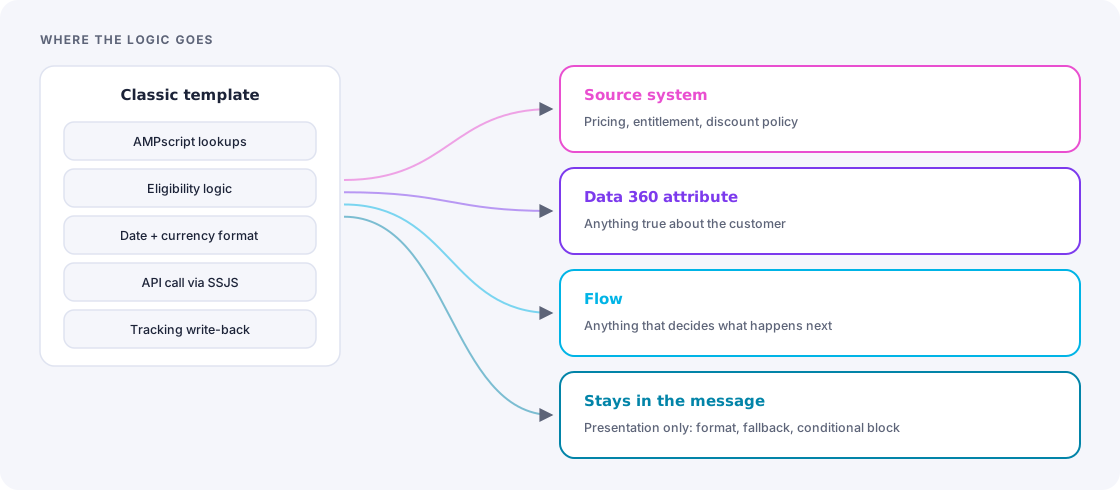
In Marketing Cloud Next it moves up a layer, and there are three sensible destinations:
- Flow — for decisions that determine what happens next in an orchestration. Which path, which message, which wait.
- The data layer — for anything that is really an attribute of the customer. Lifecycle stage, tier, propensity, eligibility flag. Compute it once, in Data 360, and let every channel read it.
- The source system — for anything that is really a business rule the rest of the company also depends on. Pricing, entitlement and discount policy do not belong in a marketing tool at all, and the migration is a good moment to say so out loud.
Bucket four: integration and CloudPages
This is the bucket with no comfortable answer, so it deserves a direct one.
CloudPages have no equivalent in Marketing Cloud Next. Preference centres, gated content pages, custom forms, microsites, unsubscribe handlers — all of it needs a new home. The realistic options, in rough order of how often they fit:
- Experience Cloud for anything that is genuinely a customer-facing page backed by Salesforce data, including most preference centres.
- Your existing web platform for content pages and forms, posting into Salesforce via API. Often the right answer that nobody suggests, because the marketing team is used to owning the page.
- A dedicated forms product where the requirement is really “a form with logic,” not “a page.”
- A small custom application where the requirement is genuinely bespoke and business-critical.
Server-side JavaScript used for API orchestration — calling an external service mid-send, writing back to a system, brokering a token — likewise moves out. Those are integration concerns, and they belong in an integration layer where they can be monitored, retried and secured, not in a send context where a failure produces a blank email.
Find the CloudPages nobody remembers
CloudPages accumulate. Old competition entry forms, a preference centre from two rebrands ago, a landing page for an event in 2021 that still receives traffic from a PDF someone published. Inventory them by URL and check the traffic before you decide what to rebuild. Some need rebuilding, some need redirecting, and some just need to stop existing.
A translation worked through
Take a common pattern: an order-confirmation email that looks up the customer’s assigned service representative, formats the delivery date to the recipient’s locale, shows a loyalty upgrade block if they are within 100 points of the next tier, and writes a send record to a tracking data extension.
Four pieces of AMPscript, four different destinations:
| Piece | New home | Why |
|---|---|---|
| Service rep lookup | Data model — a related attribute on the profile | It is a fact about the customer, not about the email |
| Locale date formatting | Expression in the content | Genuinely presentation |
| Loyalty upgrade eligibility | Data layer as a computed attribute, surfaced as a flag | Every channel wants this, not just email |
| Send tracking write-back | Platform engagement data plus Flow, not custom code | The platform records this natively; the custom write existed because the old one did not |
Notice what happened: one template with four code blocks became one template with one expression, plus two modelled attributes that the rest of the business can now use, plus nothing at all for the fourth. That is the pattern across a whole estate. The rebuild is not a translation exercise — it is a redistribution, and the message ends up much thinner than it was.
How to run the inventory
Practical sequence for a team facing a large code footprint:
- Extract every code block from emails, templates, content blocks, CloudPages and script activities into one list with its location.
- Tag each with a bucket — presentation, retrieval, logic, integration.
- Deduplicate ruthlessly. The same salutation-with-fallback pattern will appear dozens of times. It is one translation, not dozens.
- Check what is live. Code in an email nobody has sent since 2023 is not scope.
- For every retrieval, write the attribute it implies. That list becomes the Data 360 backlog.
- For every integration, name its new owner. If nobody will own it outside the marketing platform, that is a finding worth escalating early.
The takeaway
Losing AMPscript feels like losing capability. In practice, most teams discover they were using a scripting language to compensate for a data model that could not answer their questions. Marketing Cloud Next asks you to answer those questions once, in the data layer, and then to keep the message simple.
The migration cost is real. The result is a system where a marketer can read a template and understand what it will send — which, after a decade of AMPscript, is a genuinely new experience.
Frequently asked
Seeing this in your own org?
The first call is free: thirty minutes, no slides, and an honest read on what a fix would take. If it is not worth doing, you will hear that too.