For most of the last decade, marketing automation and Salesforce automation were separate crafts. Marketing built journeys and engagement programs; admins built workflow rules, then process builders, then flows. The two groups met at the connector and argued about sync.
Marketing Cloud Next ends that separation. Flow is the automation engine, and it is the same Flow your admins already govern. You do not need to become a Salesforce developer. You do need enough of a mental model to specify work precisely, spot a bad design before it ships, and understand why an admin sometimes says no.
Key takeaways
- The trigger type is the single most consequential choice in a flow. Get it wrong and you inherit timing bugs that are painful to diagnose later.
- Five patterns cover the large majority of marketing automation: qualify, enrich, route, orchestrate, and clean up.
- Flows fail loudly for users and silently for automated processes. Decide who receives the error emails before you go live.
- One flow per object per purpose, with entry criteria, beats many small flows that all fire on the same record.
- Anything that sends a message to a human needs a test path, an error path and a documented owner. No exceptions.
The trigger decision
Everything downstream depends on when the flow runs. In practical marketing terms:
| Trigger | Runs when | Use for | Watch out for |
|---|---|---|---|
| Record-triggered, before save | A record is created or updated, before it hits the database | Setting field values on the same record — normalising country, stamping a source, defaulting an owner | Cannot send emails, call other systems or create records |
| Record-triggered, after save | Immediately after the record is committed | Creating related records, campaign membership, notifications, calling other automation | Recursion. A flow that updates the record that triggered it will trigger itself |
| Scheduled | On a defined cadence against a set of records | Score decay, stale-lead recycling, nightly hygiene, batch status changes | Volume limits and run windows. A schedule that grows with your database will eventually time out |
| Platform event / async | An event is published by another system or process | Decoupling marketing reactions from the transaction that caused them | No guaranteed ordering — never assume event B arrives after event A |
| Screen flow | A person clicks it | Guided data entry, campaign request intake, one-off operational tools | Only as good as the adoption; an unused screen flow is worse than a spreadsheet |
If you take one thing from this table: “after save” plus “update the triggering record” is the most common self-inflicted wound in Salesforce marketing automation. When the intent is simply to set a field on the record you already have, before-save is faster, cheaper and cannot loop.
Pattern one: qualify
Evaluate a record against criteria and stamp the result. Grading, MQL flags, lifecycle stage, ICP fit.
The design rule here is store the reason, not just the result. A flow that sets Lifecycle_Stage = MQL is half a flow. One that also sets MQL_Reason and MQL_Date gives you a debuggable, reportable, explainable system — and saves the argument about why a specific lead qualified three weeks ago.
Pattern two: enrich
Fill gaps from data you already hold. Copy account-level firmographics down to the lead. Derive a region from a country. Normalise job titles into seniority bands.
Normalise on write, not on read
Every segment, report and personalisation that has to handle “Germany”, “DE”, “Deutschland” and “germany” separately is paying interest on a decision nobody made. Normalise once in a before-save flow at the point of entry, and every downstream consumer gets it free.
Pattern three: route
Assign ownership and notify. This is where marketing automation touches revenue directly, so it deserves the most care.
A robust routing flow has four parts: the assignment logic, a fallback for when the logic finds nobody, a notification to the new owner, and a timestamp of when routing happened. The fallback is the part that gets skipped and the part that causes the incident — because “no matching territory” silently leaves the record with whoever created it, usually a system integration user, and nobody looks at that queue.
Pattern four: orchestrate
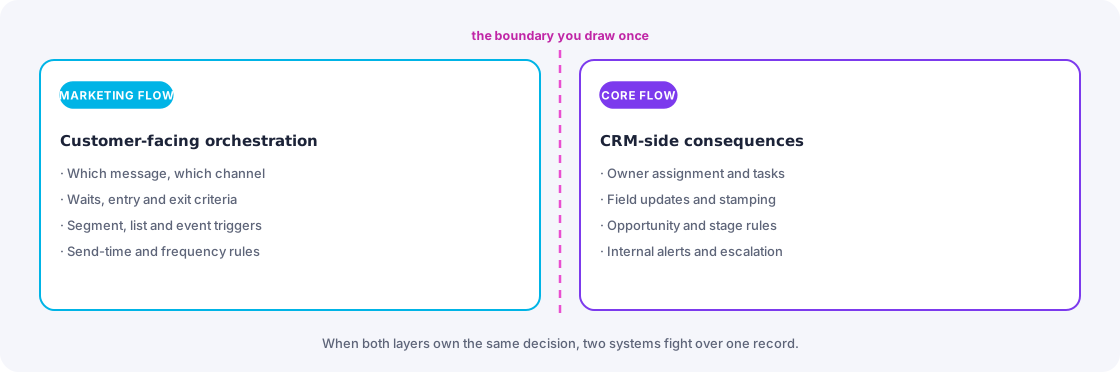
Coordinate across steps and time: wait for a condition, then act. In Marketing Cloud Next this is where marketing flows and core flows meet, and the boundary matters.
A workable division of labour: let the marketing flow own the customer-facing sequence — what message goes out, in what channel, with what waits and exits. Let core flows own the CRM-facing consequences — task creation, owner changes, opportunity stage rules, internal alerts. When both layers try to own the same decision, you get two systems fighting over one record, and the loser is whoever debugs it at 6pm.
Pattern five: clean up
The unglamorous scheduled work that keeps everything else honest: decay scores, expire stale MQLs, close out campaign members, archive test records, flag records missing required fields.
Give every cleanup flow a dry-run mode. A flow that can log what it would have changed, without changing it, is a flow you can safely point at production data. Building that switch costs an hour and saves the one incident where a criteria typo touches forty thousand records.
Governance: the boring part that decides your uptime
Consolidate per object and purpose
Salesforce lets you build many flows on the same object. It does not guarantee an order you can rely on. Where multiple flows share a trigger, ordering becomes an implicit dependency nobody documented, and someone will eventually reorder it by accident. Prefer one well-structured flow per object per timing, with clear entry criteria and named decision branches.
Decide who gets the errors
When a flow fails in an automated context, the error goes to an email address configured on the flow — by default, the last person who modified it. That is how a departed contractor ends up being the only human notified that your lead routing has been broken for a fortnight. Point failures at a monitored distribution list on day one.
Entry criteria are a performance feature
A flow that runs on every update and then immediately decides to do nothing still costs execution time on every update. Set entry conditions so the flow only runs when the fields it cares about actually change. On a busy org this is the difference between fast saves and users complaining that the page hangs.
The limits you will meet first
Marketing automation hits governor limits in predictable places: bulk imports that trigger per-record flows, scheduled flows whose record set grows quarter over quarter, and recursive updates between two flows on related objects. All three are design problems, not capacity problems — and all three are much cheaper to avoid than to unpick.
How to specify a flow when you are not the builder
Marketing operations people are frequently the requester, not the implementer. A request that gets built correctly the first time contains six things:
- The trigger. What event should start this, precisely — record created, field changed from X to Y, a schedule, a button.
- The entry criteria. Which records are in scope and, just as importantly, which are explicitly out.
- The actions, in order. With the fields and values spelled out rather than described.
- The exceptions. What happens when the expected data is missing, or nobody matches the routing rule.
- The test cases. Three named records and what should happen to each.
- The owner. Who gets the error emails and who reviews this in six months.
Hand that over and you will get what you asked for. Hand over “can you make it so hot leads go to the right rep” and you will get a conversation, a rebuild, and a delay.
The takeaway
You do not need to build flows to benefit from understanding them. You need to know which trigger fits the job, which of the five patterns you are asking for, and which governance question — errors, entry criteria, ownership — is going to bite if nobody answers it. That knowledge turns marketing operations from a requester into a design partner, which is the difference between automation that ships and automation that queues.
Frequently asked
Seeing this in your own org?
The first call is free: thirty minutes, no slides, and an honest read on what a fix would take. If it is not worth doing, you will hear that too.