Deliverability conversations usually start after something has gone wrong. Open rates halved. A major mailbox provider started filtering everything to spam. Sales says a prospect never received the follow-up. And the first question is always the same: is our authentication set up correctly?
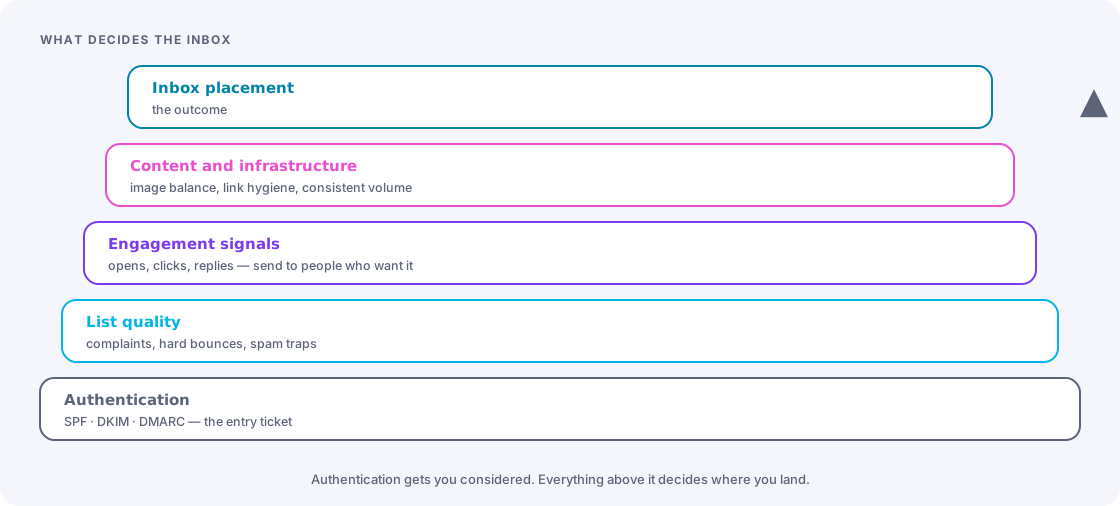
Usually it is — mostly. Authentication is the entry ticket. It gets you considered. What decides whether you reach the inbox is reputation, and reputation is built from who you send to and how they react.
Key takeaways
- SPF, DKIM and DMARC are mandatory, not optional. Major mailbox providers enforce them for bulk senders.
- DMARC must be deployed in stages. Going straight to
p=rejectwill block legitimate mail you forgot about. - Use a dedicated subdomain for marketing mail so a bad month does not damage your corporate email.
- Complaint rate is the metric providers weight most heavily. Keeping it low is largely a list-quality problem.
- Engagement-based sending — mailing people who actually open and click — is the strongest lever most senders never pull.
The authentication trio
SPF — which servers may send as your domain
A DNS TXT record listing the systems authorised to send mail for your domain. When Account Engagement sends on your behalf, its sending infrastructure must be included, typically via an include: mechanism.
Two constraints trip people up. SPF has a hard limit of ten DNS lookups; each include: consumes at least one, and organisations with many mail-sending services quietly exceed it, at which point SPF fails for everything. And you can only have one SPF record per domain — two records is a misconfiguration, not a merge.
DKIM — a signature proving the message was not altered
A cryptographic signature added to outgoing mail, verified against a public key published in DNS. In Account Engagement you generate the key material in the platform and publish the corresponding DNS records.
DKIM is the strongest of the three signals because it survives forwarding, which SPF does not. If you only get one thing right, get DKIM right — and use a 2048-bit key where your DNS provider supports it.
DMARC — the policy that ties them together
DMARC tells receiving servers what to do when SPF and DKIM checks fail, and where to send reports. It also enforces alignment: the domain in the visible From address must relate to the domain that passed authentication. This is the part that catches misconfigured setups which technically “pass” SPF for an unrelated domain.
| Policy | Effect | When to use |
|---|---|---|
p=none | Monitor only. Nothing is blocked; reports are sent. | Weeks 1 to 4. Discover every system sending as your domain. |
p=quarantine | Failing mail goes to spam | Once reports are clean, often with a percentage rollout |
p=reject | Failing mail is refused outright | The destination. Only after quarantine has run clean. |
Never start at reject
Almost every organisation has forgotten senders: an invoicing system, an HR tool, a regional office’s mail server, a legacy application nobody owns. A p=none monitoring period exists to find them. Skipping it means discovering them by way of a director asking why their supplier never received the contract.
Domain strategy
Send marketing mail from a dedicated subdomain — mail.yourcompany.com, news.yourcompany.com — rather than from your root corporate domain.
The reason is reputation isolation. Mailbox providers build reputation partly at domain level. If a marketing campaign to a stale list generates complaints, that damage lands on the subdomain rather than on the domain your sales team uses for individual emails and your finance team uses for invoices. The separation costs nothing and is very hard to retrofit once you have a problem.
Keep the visible From address human and consistent. A recognisable sender name that does not change every campaign is itself a deliverability asset, because recipient recognition drives the engagement signals providers measure.
What actually decides the inbox
With authentication correct, providers judge you on behaviour. In rough order of weight:
Complaint rate
The share of recipients marking you as spam. This is the metric with the sharpest consequences — major providers have set explicit thresholds for bulk senders, and exceeding them causes filtering quickly. The practical defence is simple: make unsubscribing easy and obvious, honour one-click list unsubscribe headers, and never make someone hunt for the link. A person who cannot find the unsubscribe button will use the spam button, and that costs you far more.
Bounce rate
Hard bounces must be suppressed immediately and permanently. A rising hard-bounce rate signals a list acquired or maintained badly, and providers treat repeated attempts to invalid addresses as a spam signal in itself.
Engagement signals
Opens, clicks, replies, and the absence of deletion-without-reading. Providers infer whether recipients want your mail. This is the strongest lever available and the one most senders never pull, because pulling it means sending to fewer people.
Spam traps
Addresses that exist only to catch senders with poor list hygiene. Pristine traps have never opted in — hitting one means purchased or scraped data. Recycled traps are abandoned addresses reactivated as traps — hitting one means you are mailing people who stopped engaging years ago. Both are avoided by the same discipline: never buy lists, and sunset inactive contacts.
The engagement-based sending model
This is the highest-return change available to most Account Engagement senders. Instead of mailing your whole database, segment by recency of engagement and treat each tier differently:
| Tier | Definition | Treatment |
|---|---|---|
| Active | Opened or clicked in the last 90 days | Full frequency. These are your reputation. |
| Cooling | Engaged 90 to 180 days ago | Reduced frequency, highest-value content only |
| Dormant | No engagement in 180 to 365 days | A defined win-back sequence, then a decision |
| Inactive | No engagement in over a year | Suppress from regular sending. Keep the record; stop the mail. |
The objection is always the same: we are throwing away reach. In practice, mailing dormant contacts depresses your aggregate engagement rate, which lowers your standing with providers, which reduces inbox placement for the people who do want your mail. Sending less to the wrong people is how you reach more of the right ones.
Run the win-back properly, once
Before suppressing a dormant segment, run a short, honest sequence: a plain-text-style email asking whether they still want to hear from you, with one obvious link to stay subscribed and one to leave. Response rates are low by design. The people who click are worth more than the ones who never opened, and the ones who leave were costing you reputation.
Content factors that still matter
Content is a smaller factor than reputation, but the basics are cheap:
- Text and image balance. An email that is one large image is a classic spam pattern and fails for recipients with images disabled.
- Link hygiene. Links should point to domains that align with your sending domain. Shorteners and unfamiliar redirect domains are a negative signal.
- Consistent sending patterns. Volume spikes look like compromise. Ramp up gradually when scaling.
- A working plain-text alternative. Both for accessibility and because its absence is unusual enough to notice.
- Honest subject lines. The gap between the subject and the content is what generates complaints, and complaints are the metric that matters most.
Monitoring
Four things, checked on a regular cadence:
- DMARC reports. Aggregate reports arrive as XML; use a parser or a reporting service rather than reading them by hand. They tell you who is sending as you.
- Provider postmaster tools. The major mailbox providers publish sender dashboards showing reputation, spam rate and authentication results for your domain. Free, and the closest thing to seeing what they see.
- Blocklist status. Check your sending domain and IPs periodically. Getting listed is recoverable; not knowing for six weeks is not.
- Seed-list placement testing before major campaigns, to see whether you are landing in the inbox, the promotions tab, or spam across common providers.
The 30-minute setup, and the ongoing work
The authentication piece genuinely is a short job for someone with DNS access: publish the SPF include, publish the DKIM records generated in Account Engagement, publish a DMARC record at p=none with a reporting address, and verify each one. Half an hour of work plus DNS propagation.
The rest — staging DMARC to reject, adopting engagement-based sending, running win-backs, watching complaint rates — is ongoing, and it is where the actual results come from. Teams that treat deliverability as a setup task get authenticated mail that lands in the promotions tab. Teams that treat it as a hygiene practice reach the inbox.
Frequently asked
Seeing this in your own org?
The first call is free: thirty minutes, no slides, and an honest read on what a fix would take. If it is not worth doing, you will hear that too.