Almost every Marketing Cloud Engagement estate has a business unit structure that made sense once. One per brand. Or one per country. Or one per team, because two teams once had an argument about a shared template. Over time the structure hardened, data got duplicated across it, and reporting across the whole customer base became somebody’s quarterly ordeal.
Marketing Cloud Next gives you a chance to redo that decision, and it separates two concerns the old model bundled together: how data is partitioned and who is allowed to do what. Those should not be the same lever.
Key takeaways
- Data spaces partition data. Permissions control access. Do not use one to solve the other.
- Partition when data genuinely must not mix — separate legal entities, incompatible consent regimes, acquisitions with distinct customer bases.
- Every partition you create is a cross-partition report you will later be asked to produce.
- Segmentation quality depends on modelled attributes, not on segment builder cleverness. Push logic into attributes.
- Name things for what they are, not for who currently owns them. Team names change; brands and legal entities change less.
The question the old model never made you answer
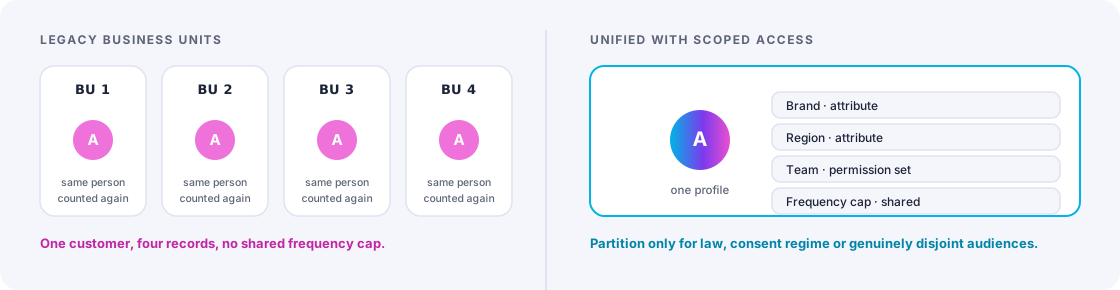
In Engagement, a business unit did several jobs at once: it separated sending identity, it scoped user access, it partitioned data extensions, and it structured reporting. Because one object did all four, teams created business units for whichever reason came first — and then inherited the other three consequences whether they wanted them or not.
The most common casualty was the customer view. Once the same person exists as separate subscriber records in four business units, “how many customers do we have” becomes a question requiring a data warehouse and an analyst.
Marketing Cloud Next, built on Data 360, unbundles this. The default is a unified customer view. Partitioning is something you do deliberately, for reasons you can state, and it costs you the very thing the platform is for.
When partitioning is genuinely right
Four situations justify a hard data partition:
| Situation | Why partition |
|---|---|
| Separate legal entities | Different controllers under data protection law. Data mixing may be unlawful, not just untidy. |
| Incompatible consent regimes | Consent collected by entity A does not transfer to entity B. If the profile is shared, the consent model must be watertight — or the data must be separate. |
| Recent acquisition with an unresolved customer base | You do not yet know whether these are the same customers. Partition now, unify when you have decided. |
| Genuinely disjoint audiences | A B2B distributor arm and a B2C retail arm with essentially no overlap. Unification adds cost and no insight. |
Notice what is not on that list: brands within one legal entity, countries within one entity, teams, or product lines. Those are almost always permission, tagging and reporting problems wearing a partition costume — and the customer usually does overlap, which is precisely the insight you lose by separating them.
The cost you pay later
Every partition creates a future request: “can we see total customers across both?”, “can we suppress brand B’s audience from brand A’s campaign?”, “why is this person counted twice?”. Each of those is solvable, and each costs engineering time that a single well-permissioned space would not have needed. Count that cost at design time, because nobody counts it at the time the partition is created.
Doing brand separation without partitioning
If brands share a legal entity and a customer base, you can get everything teams actually want without splitting the data:
- Sending identity per brand — sender name, from-address, authenticated domain and reply handling are configuration, not data architecture.
- Content and template libraries per brand, with shared components where it helps and separation where brand teams need control.
- Permission scoping so the brand A team sees and edits brand A assets, journeys and campaigns.
- Brand as an attribute on engagement and campaign records, so reporting can slice by brand and also roll up.
- Cross-brand suppression and frequency rules, which are only possible because the profile is shared — and which are usually the first thing a multi-brand organisation asks for once it realises it can.
That last point is worth dwelling on. Multi-brand groups routinely discover that their most valuable customers are being contacted by three brands in the same week, with no shared frequency cap, because the architecture made that invisible. A unified profile makes it visible on day one.
Segmentation: where the real quality lives
With the structure settled, segmentation becomes an exercise in data modelling rather than in query building. Three principles matter far more than tool proficiency.
1. Push logic into attributes
A segment definition that runs to fifteen nested conditions is a modelling gap. If “engaged in the last 90 days” is used in twenty segments, it should be one computed attribute, defined once, that twenty segments reference. Otherwise you have twenty slightly different definitions of engagement and no way to know which one a given report used.
The definitions register
Keep a one-page list of your computed marketing attributes: name, plain-English definition, refresh cadence, owner. Engaged, active customer, lapsed, high value, churn risk. When someone asks “what counts as active?” there is one answer. This single page prevents more reporting arguments than any dashboard.
2. Design for refresh, not just for correctness
A segment is a question asked on a cadence. Ask when it refreshes, how long the refresh takes, and what happens to a journey mid-flight when membership changes. A segment that is correct but recalculates too slowly to drive a same-day campaign is not fit for its purpose, and that is a design fault rather than a platform limitation.
3. Separate audience from eligibility
Two different questions get confused constantly. Audience is “who is this campaign for” — a marketing decision. Eligibility is “who are we allowed and able to contact” — consent, suppression, frequency caps, deliverability status, active service issues.
Keep them apart. Audience logic belongs to the campaign; eligibility belongs to the platform and should apply automatically to everything. When eligibility rules are copied into individual segment definitions, one of them will eventually be forgotten, and the resulting send is the kind that reaches a legal inbox.
A structure that ages well
For a typical mid-to-large organisation with several brands in one legal entity, the shape that holds up looks like this:
- One data space, unless a legal or consent boundary forces otherwise.
- Permission sets by team and brand, reviewed quarterly.
- Brand and region as attributes, present on profiles, campaigns and engagement records.
- A shared computed-attribute layer, owned by marketing operations, documented on one page.
- Platform-level eligibility rules that every campaign inherits without opting in.
- Brand-scoped content libraries, with a small shared component set for things like legal footers.
The test of a good structure is a simple one: can a new marketing hire, in their first week, work out where to put a new campaign without asking anyone? If the answer requires tribal knowledge about which business unit was created for which historical reason, the structure is carrying debt.
The takeaway
Data spaces are a strong tool used sparingly and an expensive mistake used liberally. Partition where law or genuinely disjoint audiences require it. Solve everything else with permissions, attributes and content scoping — and get the unified customer view you are paying for.
Frequently asked
Seeing this in your own org?
The first call is free: thirty minutes, no slides, and an honest read on what a fix would take. If it is not worth doing, you will hear that too.