Webinars are the highest-intent thing most B2B teams do, and the worst-instrumented. Someone gives you 45 minutes of undivided attention, and the system records it as a form fill.
What this package fixes
- Registration data flowing into Salesforce automatically, with the right campaign and member status.
- Attendance imported — attended, partial, no-show — instead of a spreadsheet someone forgets.
- Scoring that reflects reality: 45 minutes watched is not the same signal as a registration.
- Follow-up that branches on behaviour, sent within 24 hours rather than next Tuesday.
- Reporting that shows what the webinar contributed to pipeline, not just how many signed up.
The three leaks
1. Registration lands somewhere else
People register in Zoom, GoToWebinar, Teams or ON24. That list sits in the webinar platform. Someone exports a CSV, someone else imports it — usually late, sometimes with the wrong campaign, occasionally not at all. Every gap is a lead your sales team never sees while they are still warm.
2. Attendance never comes back
Registration is easy to capture and almost useless on its own. The valuable signal is attended, and for how long. Someone who watched 40 of 45 minutes is a genuinely different prospect from someone who registered and forgot. Most setups cannot distinguish them, so both get the same score and the same email.
3. The follow-up treats everyone the same
“Thanks for attending!” — sent to the half who did not attend. It is a small thing that signals clearly that nobody is paying attention, from a team whose entire pitch is that they pay attention.
What you get
| Deliverable | Detail |
|---|---|
| Platform connection | Zoom, GoToWebinar, Teams, ON24 or Livestorm — via native connector where one exists, otherwise API or a scheduled import |
| Registration sync | Straight into the right campaign with the correct member status, no manual step |
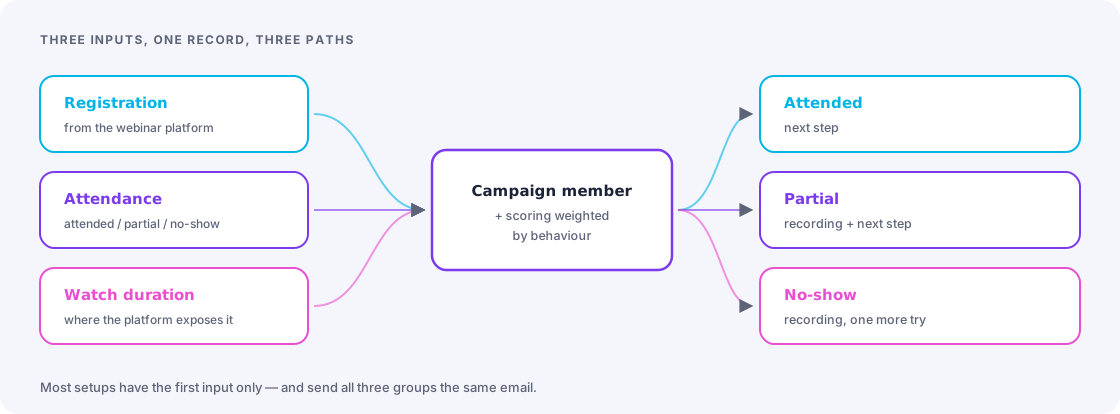
| Attendance import | Attended / partial / no-show, plus watch duration where the platform exposes it |
| Scoring rules | Weighted by behaviour: attendance scores meaningfully above registration, long watch above short |
| Three-path follow-up | Attendees get the next step, partials get the recording plus the next step, no-shows get the recording and one further attempt |
| Reminder sequence | The pre-webinar sends that lift attendance rates, which is usually where the biggest gain sits |
| Campaign reporting | Registrations, attendance rate, influenced pipeline — in Salesforce, not in the webinar tool |
| A repeatable template | Cloneable for every future webinar, so the second one takes an hour to set up |
The reminder sequence usually pays for the package
Registration-to-attendance rates of 35–45% are typical, and a properly designed reminder sequence — 24 hours, 1 hour, and “we’re live now” — reliably moves that. You already paid to acquire every registrant. Getting more of them into the room is the cheapest improvement available in the whole programme.
How it runs
- Days 1–2. Which platform, what the API exposes, how your campaigns and statuses are structured today.
- Days 3–6. Build the connection, the campaign structure, the scoring rules and the import path.
- Days 7–9. Build the reminder sequence and the three-path follow-up.
- Day 10. Dry run against a real or test webinar, end to end, including a no-show.
Best for
- Teams running webinars monthly or more and still moving CSVs by hand
- Anyone whose sales team asks “did they actually turn up?” and cannot get an answer
- Organisations where webinars are a main demand-generation channel but contribute nothing visible to pipeline reporting
- Teams about to run an event series who would rather build the machinery once
Price and duration
From €2,900. One to two weeks. Fixed scope, fixed price. The final figure depends on which webinar platform you use and whether it has a native connector — I will tell you which bracket you are in before you commit.
Sound like your org?
Thirty minutes, free, no slides. Bring your questions about scope, timing or whether this package is even the right one — you will get straight answers.