In Journey Builder you mostly asked one question: what puts someone into this journey? In Marketing Cloud Next you have a broader set of flow triggers to choose from, and the choice has consequences you feel months later — in timing, in volume, and in how hard the thing is to debug.
This is not a difficult decision. It is just one that gets made implicitly, by whoever builds first, and then inherited by everyone else.
Key takeaways
- The trigger type is the most consequential early choice, and the hardest to change later.
- Segment- and list-triggered flows suit audience-based campaigns; data- and event-triggered flows suit reacting to something that happened.
- Scheduled flows are for cadence, not for reaction — using one to fake real time creates timing bugs that are painful to trace.
- Volume and timing behaviour differ per trigger. Size them before you build, not after the first big send.
- Write down which trigger each flow uses and why. It is the first question when something misfires.
The question behind the question
Before comparing trigger types, answer one thing: is this campaign about a population, or about an event?
A population is a group that qualifies over time — customers who reached gold tier, prospects in a target industry who have not been contacted this quarter, subscribers who lapsed. Membership changes gradually and the campaign is about who is in the group.
An event is something that happened to one person at a moment — an order shipped, a form submitted, a booking cancelled, a support case closed. The campaign is about reacting, and timing is part of the message.
Nearly every trigger mistake comes from answering this wrong. Population campaigns built on event triggers become fragile and chatty; event campaigns built on segment refreshes arrive too late to be relevant.
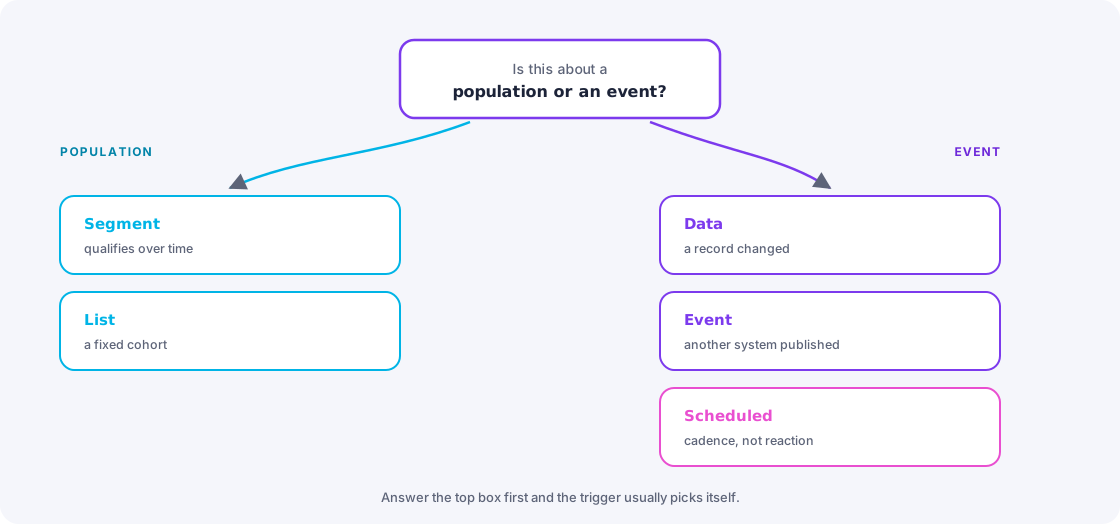
The trigger types, and what each is actually for
| Trigger | Fires when | Best for | Fails when |
|---|---|---|---|
| Segment | A profile enters (or leaves) a defined segment | Lifecycle campaigns, tier changes, lapsed-customer programmes | You need same-minute reaction — refresh cadence sets your floor |
| List | A fixed audience is handed to the flow | One-off sends, event invitations, imported cohorts | You expect continuous entry — a list is a snapshot, not a stream |
| Data | A record is created or changed | Reacting to CRM state: order created, case closed, stage moved | The change is noisy — a field that updates constantly triggers constantly |
| Event | An event is published from another system | Real-time reaction with decoupled systems | You assume ordering — events do not guarantee arrival sequence |
| Scheduled | On a defined cadence | Cadence work: digests, reminders, hygiene, decay | Used to approximate real time. It works in testing, then drifts in production |
The four mistakes worth naming
1. The schedule pretending to be a reaction
A flow runs hourly, checks whether anything happened in the last hour, and reacts. It passes testing because the tester waits. Then it goes live and someone abandons a basket at 11:58, receives the reminder at 12:47, and the “within minutes” promise in the brief quietly became “within the hour.”
Worse, it is hard to spot after the fact, because nothing errors. If the requirement says real time, use a data or event trigger. If the requirement can tolerate a window, write the window into the brief so nobody is surprised.
2. The noisy data trigger
A flow triggers on any change to the contact record. It works fine until an integration starts stamping a last-synced timestamp on every record nightly, and suddenly the flow fires for the whole database at 2am.
The fix is entry criteria that name the specific field change you care about, not “record updated.” This is cheap to do at build time and disruptive to retrofit once volume is real.
Ask what else writes to that field
Before triggering on a field change, find out every process that writes to it: integrations, batch jobs, other flows, data loads, and the users who edit it by hand. A trigger is only as well-behaved as the noisiest writer upstream.
3. The list that should have been a segment
Someone builds a campaign against an imported list because that was fastest. Three weeks later the business asks why new qualifying customers are not receiving it. They are not receiving it because a list is a snapshot — it does not grow.
Lists are correct for genuinely fixed cohorts: an event’s registrant list, a specific pilot group, a one-off announcement. If the answer to “should new people who qualify enter this?” is yes, it is a segment.
4. Assuming event ordering
A flow assumes the “payment confirmed” event arrives after “order created.” Usually it does. Occasionally it does not, and the flow branches on a state that has not been written yet.
Design event-driven flows to be tolerant: check state rather than assuming sequence, and make steps idempotent so a repeated event does not produce a repeated message.
Entry, re-entry and exit — decided at the same time
The trigger is half the decision. The other half is what happens at the edges, and these three questions belong in the same conversation:
- Can someone enter more than once? If yes, after how long? A re-entry rule of “never” is a legitimate answer and should be explicit, not accidental.
- What removes someone immediately? Conversion, unsubscribe, becoming a customer, an open service case, entering a higher-priority campaign. Every flow needs a success exit — a person who did the thing should stop being asked to do it.
- What happens at the end? Timeout to a slower track, exit silently, or hand to another flow. “The flow just ends” is fine if it is a decision rather than an omission.
Test the boring paths
Before launch, run three test profiles: one who does nothing at all, one who converts on step one, and one who unsubscribes mid-flow. Those three cover the exits that matter, and they are the ones nobody tests because the happy path is more interesting.
Volume and timing: size it before you build
Each trigger type behaves differently under load, and the shape of that load is worth sketching before the build rather than discovering it during a peak.
- Segment-triggered: volume arrives in waves at refresh. A segment that gains 40,000 members overnight produces 40,000 entries at once. Check whether that is acceptable downstream — including for your sending reputation.
- Data-triggered: volume mirrors business activity, which means it spikes when the business is busiest. That is usually fine, and occasionally exactly when you least want a surge.
- Event-triggered: volume mirrors the publishing system, which may not be under your control at all.
- Scheduled: volume grows quietly with your database. A nightly job that took four minutes at launch takes forty a year later, and nobody noticed the curve.
Document the choice
One line per flow, kept somewhere findable: trigger type, why it was chosen, entry criteria, re-entry rule, exits, expected volume.
This takes two minutes at build time. It saves an afternoon every time somebody asks why a customer received something unexpected — because the first question in every one of those investigations is “what put them in here?”, and the answer should not require reverse-engineering the flow.
The takeaway
Decide population or event first, then pick the trigger that matches, then set entry, re-entry and exit in the same sitting. Most of the pain in marketing automation comes from flows where those four things were decided at four different times by three different people.
Frequently asked
Seeing this in your own org?
The first call is free: thirty minutes, no slides, and an honest read on what a fix would take. If it is not worth doing, you will hear that too.