Ask a marketing team how long an email takes and you will get a number between two hours and two weeks. The spread is not about complexity. It is about whether the team is assembling from a system or building from scratch — and most teams, honestly assessed, are building from scratch while believing they have a system.
Marketing Cloud Next takes content structure seriously. The platform gives you the pieces; whether you end up with a production system or a faster way to make a mess depends on decisions you make in the first month.
Key takeaways
- Three template families cover most organisations. Teams that end up with thirty have made thirty decisions they cannot maintain.
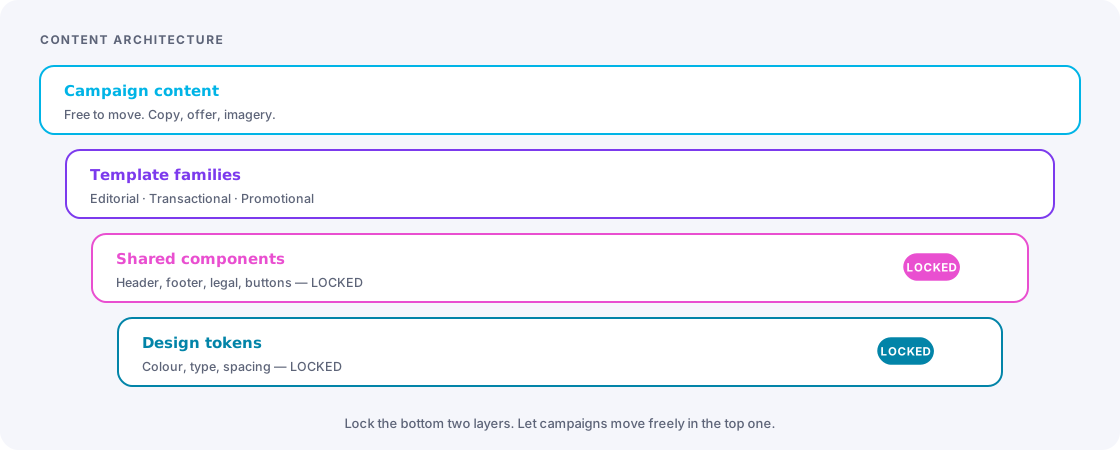
- Components should be owned centrally and consumed locally. Anything a campaign builder can edit will diverge.
- Localisation is a content-structure decision, not a translation workflow. Decide it before you build the templates.
- QA needs a written checklist that a non-expert can run. Expert intuition does not scale and does not survive holidays.
- Approval should be sized by risk. Approving every subject line teaches everyone to click through without reading.
Template strategy: three, not thirty
Template proliferation happens the same way everywhere. Someone needs a layout the existing template does not support, duplicates it, adjusts it, and ships. Six months later there are nineteen templates, four of them nearly identical, and nobody knows which is current. Then a brand refresh arrives and the true cost lands all at once.
Most organisations need three families:
| Family | Purpose | Structure |
|---|---|---|
| Editorial | Newsletters, announcements, content-led sends | Flexible stack of content blocks, generous whitespace, one primary call to action |
| Transactional and lifecycle | Confirmations, onboarding, service messages | Fixed structure, high data density, minimal decoration, clear next step |
| Promotional | Offers, launches, campaign pushes | Strong hero, product or offer grid, repeated call to action, urgency slot |
Anything that does not fit one of these is either a genuine fourth family — in which case add it deliberately, once — or a campaign trying to be a website, which is a conversation worth having with the requester rather than a template worth building.
The duplication rule
Nobody duplicates a template without a named owner approving it and writing one line about why the existing family did not work. That single friction point is what stops proliferation, and the “why” notes tell you exactly which real gap to close in the next template revision.
Component architecture
Below templates sit reusable blocks: header, footer, legal text, preference-centre link, social row, product tile, button styles. Two decisions determine whether these help or hurt.
Who can edit them. A shared footer that campaign builders can edit is not shared — it is a starting point that will drift into six variants. Central components should be locked. If a campaign genuinely needs a different footer, that is a request to the owner, and if the request recurs it becomes a second sanctioned variant.
How deeply they nest. Components inside components inside templates get hard to reason about quickly. Two levels is usually the practical limit before “why did this render like that” becomes an afternoon.
The components genuinely worth centralising: the legal footer with the imprint requirements your jurisdiction demands, the unsubscribe and preference links, the brand header, and the button component. Those four cover the majority of compliance and consistency risk in a typical estate.
Localisation: decide the model before the templates
For DACH-region work this is rarely optional, and the model you choose is hard to change later. Three approaches, with honest trade-offs:
- Separate assets per language. Simplest to understand, worst to maintain. A change to the offer means editing every language version, and one will be missed. Workable for two languages and a low send volume.
- One asset, language-conditional content. Single asset with blocks selected by a language attribute. Maintains well, but the asset becomes complex and QA has to cover every language path.
- One asset, externalised strings. Copy lives in a translation data set, keyed and referenced by the template. Scales best and separates translation workflow from build workflow. More upfront structure, and it needs a real process for getting translations in.
Choose by language count and change frequency. Two languages, changing rarely: option one is fine and do not over-engineer. Four or more, or frequent changes: option three, and accept the setup cost. Option two is the middle ground that quietly becomes option one’s maintenance problem with option three’s complexity, so pick it knowingly.
Whichever you choose, three details always need explicit handling: the preheader text (routinely forgotten in translation), date and number formatting per locale, and a fallback language for recipients whose language attribute is empty. That last one is not a rare edge case — it is what happens to every record imported before you added the field.
QA that survives a busy week
Expert QA does not scale. The person who catches everything is on holiday when the big send goes out. Write the checklist down and make it runnable by anyone.
| Check | What to verify |
|---|---|
| Personalisation | Renders for a complete profile, an incomplete profile, and a profile with unusual characters in the name |
| Fallbacks | Every dynamic value has a default, and the default reads acceptably in the sentence around it |
| Links | Every link resolves, tracking parameters are present and correct, no staging URLs |
| Rendering | Dark mode, the two or three clients your audience actually uses, and mobile width |
| Accessibility | Alt text on meaningful images, sufficient contrast, logical heading order, text that survives images-off |
| Compliance | Unsubscribe present and working, imprint details correct, sender identity matches the authenticated domain |
| Audience | Count is within the expected range, suppressions applied, seed list included |
| Content | Subject and preheader are distinct, no placeholder text, correct dates and prices |
Test with awkward data on purpose
Keep a permanent set of test profiles designed to break things: an empty first name, a very long company name, an umlaut and an apostrophe, a name in a non-Latin script, a null in every optional field, and an unsubscribed record. Send every significant campaign to that set. It takes two minutes and catches the errors that reach real people.
Approvals sized by risk
Approval processes fail in both directions. Too heavy and everything queues while people rubber-stamp. Too light and something goes out with the wrong price to the whole database.
Three tiers work well:
- Peer check — routine sends to established segments using established templates. One colleague runs the checklist. Minutes.
- Owner approval — new templates, new audiences, anything with a price or a legal claim, anything above a volume threshold you set. The named owner signs off.
- Formal review — regulated content, first send from a new domain, anything with a legal or executive stakeholder. Scheduled, with a deadline that everyone knows in advance.
Set the volume threshold explicitly, and let the tier be determined by the content and the audience rather than by who is asking or how urgent it feels. The moment urgency can downgrade a tier, the tiers stop meaning anything.
Measuring the production system itself
If you want throughput to improve, measure the process rather than only the campaign results. Four numbers, reviewed monthly:
- Cycle time from brief to send, median rather than average.
- Rework rate — the share of campaigns that go back a stage after review.
- Reuse rate — the share of sends built from existing templates and components without modification.
- Defect escape rate — issues found after send. Aim for zero, investigate every one, and fix the checklist rather than the person.
Rework rate is the most diagnostic of the four. High rework almost always means the brief was incomplete, not that the builder was careless — and briefs are much easier to fix than people.
The takeaway
A production system is three templates, a locked component layer, one localisation model, a written checklist and three approval tiers. None of it is technically difficult. All of it requires deciding once and then holding the line when someone wants a nineteenth template on a Thursday afternoon.
The payoff is not just speed. It is that a new person can produce a correct, on-brand, compliant email in their first week — which is the only durable definition of a scalable marketing team.
Frequently asked
Seeing this in your own org?
The first call is free: thirty minutes, no slides, and an honest read on what a fix would take. If it is not worth doing, you will hear that too.